 SendTo SendTo
885 Kb download
Freeware utility
Read more and Download
This is one of the neatest little FREEWARE programs I have seen in a long time. SendTo puts your right mouse button on steroids by adding Any Folder to your Send To option. This additional option will allow you to send your file to Any Folder on your computer. Right click any file, choose Any Folder and browse with Windows Explorer to any location on your hard drive. And that, my friends, is only the beginning.
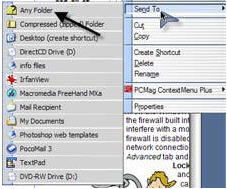 Once you find the folder you want to send your file to, you can choose to either Move Files (file will be removed from original location) or Copy Files (file copy will remain in the original location). The Other button gives you even more. Use it to Create Shortcuts, or Create a Default Zip File. You can send a file to a certain program (Applications at the top of the window). Choosing an application to send a file to will cause that program to open. Once you find the folder you want to send your file to, you can choose to either Move Files (file will be removed from original location) or Copy Files (file copy will remain in the original location). The Other button gives you even more. Use it to Create Shortcuts, or Create a Default Zip File. You can send a file to a certain program (Applications at the top of the window). Choosing an application to send a file to will cause that program to open.
If you have certain areas you send files to frequently, you might want to place a check in the box next to the words Add path to menu. This will place your most frequently used folders right in the Send To right mouse click option so you won't need to choose Any Folder. 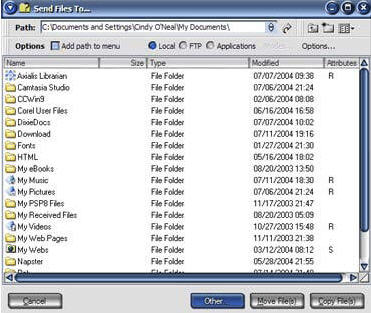 No muss, no fuss. You can even choose Applications (programs) to send certain files to. This can come in handy when double clicking will cause a file to open in one program and you prefer (occasionally) to have it open in another. Right click it instead, and choose the other program. No muss, no fuss. You can even choose Applications (programs) to send certain files to. This can come in handy when double clicking will cause a file to open in one program and you prefer (occasionally) to have it open in another. Right click it instead, and choose the other program.
With just 855 Kb to download, you won't be spending a lot of time waiting for this little treasure. Make sure you save the downloaded installation file on your desktop so it will be easy to find. To install, double click the downloaded file. Once installation is complete, you no longer need the installation file. Transfer it to a floppy disk or CD to share with your friends, or delete it.
Got questions?
Search mrswizard.com and compuquicktips.com
with Google!
|