  You can't teach a new mouse old clicks.
|
RestorationWorks with Windows 98 through XP
I found Restoration on the WJR Internet Advisor radio site in the "Ed's Excellent Advice" section. I love the way he described it as "one of those utilities you download and put away until you need it."
Since there could be hundreds of thousands of potential files to wade through, it makes sense to narrow your search by typing in part of the file name (or the extension). For example, if you are looking for Word documents, type .doc in the search box. You can also type any part of the file name you can remember. I must point out you should not count on this or any other recovery program to restore any particular files. Just because it appears as a "found" and may look like a valid file, it may not necessarily mean it can be recovered. A lot depends on where the file was originally (when it was deleted) and how long ago it was deleted. After doing a search for .pdf files I tried recovering a few just for giggles and to test Restoration. Out of 6 files, only one was successfully recovered, and it was one of the more recently deleted files. It was still very impressive to see a deleted file actually recovered after the recycle bin had been emptied and the hard drive had been defragmented several times. Just remember to keep a proper perspective on the idea of restoring long lost files. If this little program won't bring it back, chances are it is gone for good. SPECIAL NOTE: The author's website seems to have disappeared. Dang! But you can still download this great little Treasure from Snapfiles.
Utilities | Internet| Fun | Graphics
Got questions?
|
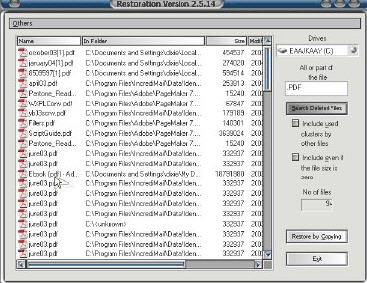 All I can say about this little Treasure is WOW! How many times have you emptied your Recycle Bin only to discover a very important file had been totally lost? Hopefully not very many, but occasional emergencies can happen, and they are not pretty. Nothing can absolutely guarantee the recovery of a lost file. Once the Recycle Bin is emptied, you should consider it gone, but there is a slim chance if you are willing to work for it.
  This is such a simple looking and easy to use program. It doesn't even need to be formally "installed," just download and click the .exe file to unpack it. A special folder will be created with all you need to run it. Open the folder and click the program file to run it. Restoration is straightforward, easy to use and totally FREEWARE. You'll get the surprise of your life when you hit the search button. You won't believe how many files will show up! There is also an option to totally remove embarrassing or otherwise useless files permanently. We don't need to speculate how this could be valuable for some.