 AutoRuns for Windows AutoRuns for Windows
FREEWARE Utility
works fine with Vista
Download size: 490Kb
Website
AutoRuns is the niftiest, geekiest utility I have seen in a long time. If you really want to know what is going on when you crank up your machine, this little Treasure won't hold anything back. It will show you what programs are configured to run during system bootup or login, and it will show you the entries in the order Windows processes them. There is a lot more going on than what you see in your S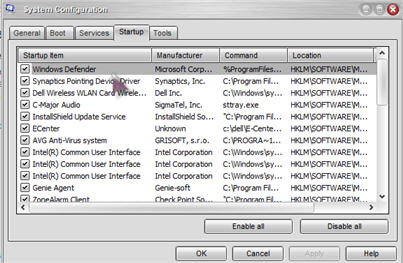 ystem Tray or your Windows Startup folder, or even typing msconfig in the run box and looking under the Startup tab. You won't believe how much is going on. ystem Tray or your Windows Startup folder, or even typing msconfig in the run box and looking under the Startup tab. You won't believe how much is going on.
This is msconfig
This is msconfig on steroids... AutoRuns
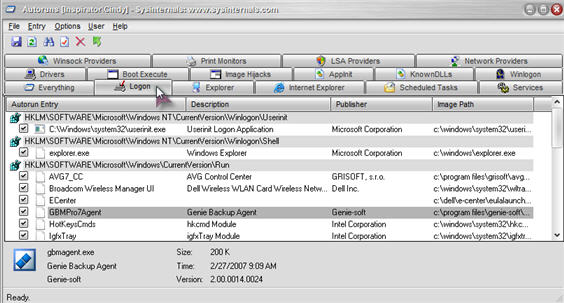
You can configure it to show other locations, including Explorer shell extensions, toolbars, browser helper objects, Winlogon notifications, auto-start services, and much more. You can choose the Hide Signed Microsoft Entries option and check out all the third-party auto-starting goodies that have been added to your system.
If you don't want an entry to open the next time you boot your computer, you can either disable or delete it. To disable, uncheck it. The startup information will be stored in a backup location so it can reactivate the entry when you recheck it.
There is nothing to install. Just download the 40 Kb zip file and unzip it to a special folder so you can find it. Double click the .exe file to run it. And be prepared to say, "WOW!" as you scroll.
This little program is for more advanced users. Obviously, if you don't know what something is, don't delete it. Autoruns is a direct link to your Registry, so you want to make sure what you turn off isn't something required by Windows. Do your research before you click. And don't send me any nasty grams if you get click happy and turn off something important (hehehe). Just use it to look and marvel at the wonders of XP! You can't get into trouble doing that.
Read more by visiting the AutoRuns web page. Scroll to the bottom of the page for a direct download link. There is a wonderful Forum too, where you can read experiences from others who are actually using it. The more you can learn, the better off you will be!
Got questions?
Search mrswizard.com and compuquicktips.com
with Google!
|