 Synchromagic Synchromagic
new version available
30 day free trial
$39.95 to purchase
Read More and Download
Anyone who has been reading CompuQuickTips for any length of time knows Mrs. Wizard's "backup speech." You can replace software, even your computer. You cannot replace your personal files. When they are gone, they are gone!
 I have put off adding Synchromagic to the Gems area entirely too long... mainly because it is such an old software (we have been using it since Windows XP) and when Vista came out, it didn't work very well any more so I had to shelve it for a while. When I tried to check for an upgrade, it looked as though the software was no longer available, hadn't been updated in quite a while... I thought it was gone for good... I have put off adding Synchromagic to the Gems area entirely too long... mainly because it is such an old software (we have been using it since Windows XP) and when Vista came out, it didn't work very well any more so I had to shelve it for a while. When I tried to check for an upgrade, it looked as though the software was no longer available, hadn't been updated in quite a while... I thought it was gone for good...
After several months of "making do" and really missing Synchromagic, I did another search and discovered happily that Synchromagic seemed to be back... and being updated again... and even had a Vista capable upgrade available. Happy to have an old friend back, I downloaded it immediately and installed it on my machine AND hubby's machine (boy was I tired of listening to him gripe about not being able to back up his stuff properly)... It was as though his "synchro" not working was all my fault... oh well.
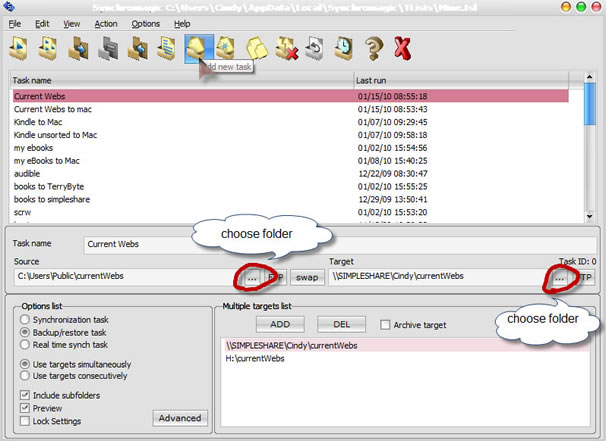
What's so good about it? It is simple to use. That's it. Click the word Edit, then New Task. Name a new task, choose the folder you want to back up, choose the folder you want to back up to and that is it. The next time to run that back up... only files that have changed will be copied.
You can back up to other folders on the same hard drive, folders on a different hard drive, folders on an external hard drive, even to folders on the Internet with an ftp connection.
 The more you use Synchromagic, the more you will LOVE it! Spend some quality time poking around in it. You will see what I mean. The more you use Synchromagic, the more you will LOVE it! Spend some quality time poking around in it. You will see what I mean.
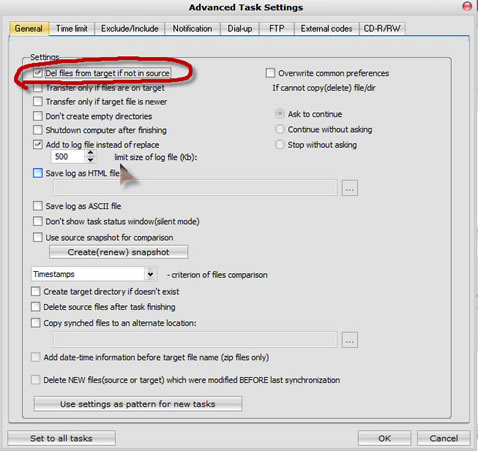
Click the Advanced button in the main window when you have a task selected and you can choose all sorts of other settings. My personal favorite for backup tasks is under the General tab under Settings. Put a check in the box next to Del files from target if not in source. This way, if you delete or rearrange files in your original folder, the changes will also be made in the folder you are backing up to. You will always have a perfect reflection of the original folder.
And did I mention it will even send files from a PC to a Mac (and vice versa)? It won't run on a mac, but it will certainly transfer files (via the pc) back and forth from a Mac. I'm using it to back up my personal files from my Mac to one of our external drives... also my current webs folder (web I am working on) back and forth from the Mac to the PC and from the PC to the Mac... it is a great way to back up and synchronize personal files.
Synchromagic isn't perfect. It isn't as pretty as some expensive backup programs are, but by golly it works... and it works great in everything from Windows XP all the way to the current Windows 7 (we are running it on hubby's and my Windows 7 machines)... and the husband especially loves it.... and when hubby is happy... well, you know the rest.
Got questions?
Search mrswizard.com and compuquicktips.com
with Google!
|