 PocoMail PocoMail
Try it for 45 days for FREE
Learn more and download
If you are ready to graduate to a serious email program that focuses on security, instead of using whatever came with your computer, PocoMail is the one you need to try. It is just as easy to use as Outlook Express, but when you see the extra security feature built right in, you will wonder what you ever did without it. This latest version works great on my Vista machine and I am really looking forward to learning more about all the new goodies with it.
Security ... I don't see any government legislating SPAM or virus-laden emails away. They can make all the laws they want, but unless they can figure out a way to police the world, cooties and spam will continue to slip through. It is up to all of us to find ways to protect ourselves and our inboxes from garbage.
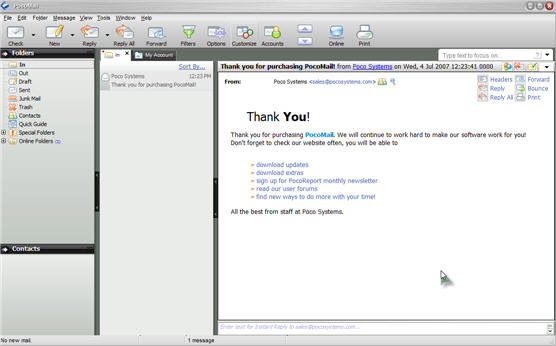
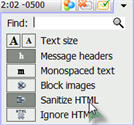 Plain Text Viewing ... Email cooties can slip into your computer with nothing more than a peek at an email from someone you don't know. All those images may be interesting, but they could also be loaded with cookies that will send confirmation of your email address. The safest way to preview email is to let PocoMail Sanitize the html in the message. It may not be as pretty, but you won't pick up any web bugs, malicious scripts or be forced to view offensive images. If it is from someone you know, you can always click the View Images button in the same area. Plain Text Viewing ... Email cooties can slip into your computer with nothing more than a peek at an email from someone you don't know. All those images may be interesting, but they could also be loaded with cookies that will send confirmation of your email address. The safest way to preview email is to let PocoMail Sanitize the html in the message. It may not be as pretty, but you won't pick up any web bugs, malicious scripts or be forced to view offensive images. If it is from someone you know, you can always click the View Images button in the same area.
PocoMail has quite a few flavors of protected email viewing. With three handy buttons so you can quickly switch from one view to another, there is no reason to be caught viewing a cootie laden email again. You have complete control.
Junk EMail ... The little trash button (to the right of the View Images button) is a handy little tool. Click it to instantly add any email sender to your junk email list. There are three levels (plus a custom level) of junk email filtering. To set it up, click the word Tools, then Junk Mail Filters. You can begin with the setting on high sensitivity. Anything that looks like junk to PocoMail will be deleted from the server and a copy will be stored in a special junk folder. If an occasional friend slips in, just right click their message listing (in the Junk Mail folder) and choose Allow Sender in the Junk Mail Filtering menu. PocoMail will remember the next time. The same applies to junk that accidentally ends up in your inbox. Right click the listing, go to the Junk Mail Filtering section and Ban the Sender.
View EMail on the Server ... This is a great way to quickly scan through your email and delete the garbage before it ever reaches your email program. Click the word File, then View Mail on Server.
Split Messages ... While security is an integral part of PocoMail, you will love all the extra features. With little retractor buttons, you can instantly expand and contract your messages, mailboxes, and email lists. See the entire message when you want, the way you want to see it.
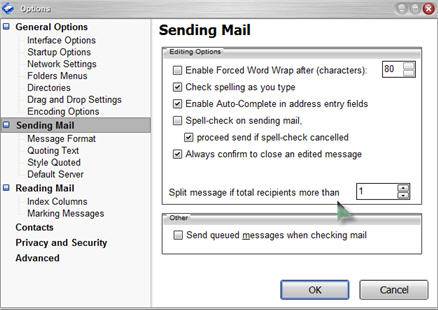 One of my favorite features is the way PocoMail can split a message sent to multiple recipients into individual emails for each recipient. This is sooooo much better, for many reasons, than using CC or BCC. To set it up, click the Options button at the top of the main window, then click Sending Mail and type in the minimum number of recipients you want before PocoMail will split it for you. One of my favorite features is the way PocoMail can split a message sent to multiple recipients into individual emails for each recipient. This is sooooo much better, for many reasons, than using CC or BCC. To set it up, click the Options button at the top of the main window, then click Sending Mail and type in the minimum number of recipients you want before PocoMail will split it for you.
Creating email is very straightforward. All the tools you need are handy, from fonts to text and background colors and inserting your favorite graphics. Save your best work as templates to use again. There really is no limit to what you can do. Every day you use it, you will discover something new. Just take your time and Enjoy!
Bottom Line? Security in PocoMail is the way it should be ... simple and convenient, without making you do without the fun stuff.
Got questions?
Search mrswizard.com and compuquicktips.com
with Google!
|